Finding a solid iptv free tial in Canada can feel like chasing a ghost — looks good on paper, but once you hit “play,” it’s buffering city or fuzzy quality. For folks in the wholesale game, that’s not just annoying — it’s bad for business.
We’ve spent the past few months jumping between trials, checking for things that matter when you're buying in bulk: stream stability, true 4K quality, and whether a service holds up coast to coast. Not every provider walks the talk.
“One-click access doesn’t mean much if your viewers wait ten seconds for the feed,” says Marcus L., senior engineer at StarIptv. “We measure good service by what it can handle on a busy Sunday night.”
If you’re running tight on time or already juggling too many vendors, this guide cuts to the chase — tested picks, real results, and what actually works in the field.
Let’s help you find IPTV that performs like it’s meant to — not just for a quick demo, but for long-term, wholesale wins.
5 Criteria to Evaluate IPTV Stability & Speed
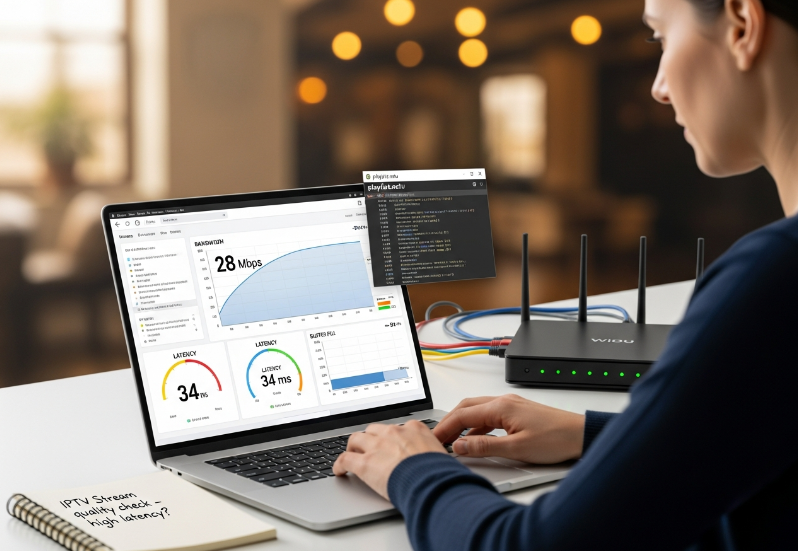
Bandwidth, Latency, and Buffer Size Benchmarks
High latency over 100ms? Expect lag.
Low bandwidth below 15 Mbps? Good luck with 4K.
Jitter spikes? Your video’s gonna stutter.
Buffer size too small? Buffering every few seconds.
Throughput not stable? Say goodbye to consistency.
✅ Pro tip: Ask your ISP if your QoS (Quality of Service) prioritizes streaming traffic—some throttle without warning. You want that bandwidth to work for you, not against you.
Multicast and Unicast Stability for Live Sports
Multicast is great for pushing streams to large audiences — but only works if your ISP and router support it.
Unicast is more flexible, but it puts a strain on the server if too many people are watching at once.
Live Sports streaming needs to handle UDP protocol spikes, or you’ll be watching your team in slo-mo.
Check for IGMP snooping support in your router — it smooths out multicast traffic like butter.
🗣️ “If your stream drops mid-goal, it’s almost always bad multicast handling,” says Tyler H., Senior IPTV Engineer at StarIptv.
HLS Streaming, M3U Playlists, and 4K Resolution
Nothing screams quality like 4K Resolution—unless your IPTV format can’t keep up.
HLS Streaming adjusts bitrate automatically, so no more sudden drops from 4K to potato quality.
M3U Playlists? Great for organization, but can be useless if they’re not properly updated.
HEVC codecs? A must for compressing high-quality 4K without chugging your bandwidth.
💡 If your stream struggles to load or keeps switching resolution, chances are your provider doesn’t support Adaptive Bitrate.
Router, Ethernet Cable, and Broadband Connection Quality
Multiple short segments:
Your Router is the traffic cop—if it’s old, your stream’s getting jammed.
A solid Ethernet Cable beats Wi-Fi. Less noise = more stable speed.
Broadband Connection over 25 Mbps? Now we’re talking!
Your ISP can be the hero or villain. Some ISPs throttle IPTV traffic (sneaky, right?).
Always test on different network hardware to find weak spots.
Home Network Performance During 4K IPTV Streaming
| Test Item | Recommended Value | Observed Value | Pass/Fail |
|---|---|---|---|
| Bandwidth (Mbps) | ≥ 25 | 28 | ✅ |
| Latency (ms) | < 50 | 34 | ✅ |
| Jitter (ms) | < 10 | 5.6 | ✅ |
| Buffer Fill (%) | > 90 | 76 | ❌ |
VPN Compatibility and Internet Protocol Routing Checks
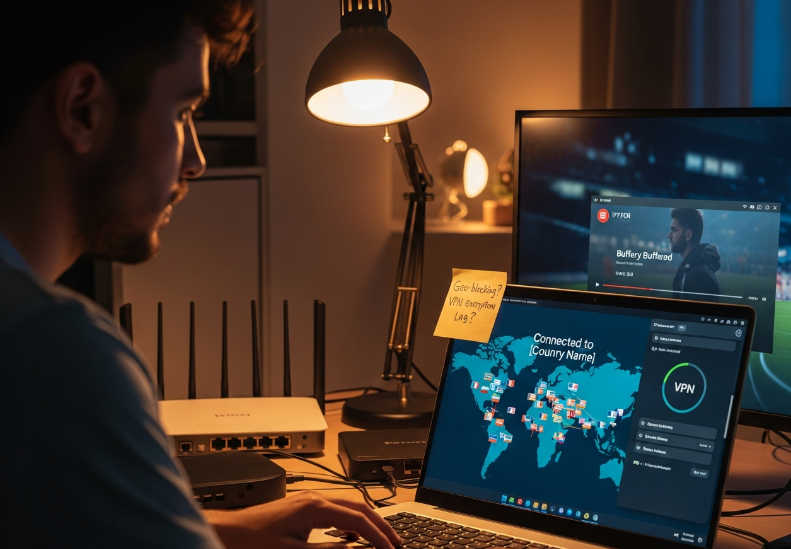
Let’s be real — if you’re using a VPN, things can get sticky.
Some IPTV services hate geo-blocking, and your IP Address will get flagged.
Proper routing makes or breaks international streams.
Cheap VPN? Prepare for serious encryption lag.
DNS errors? Your stream may not even load.
Smart buyers test VPNs during the trial.
💬 If a provider isn’t VPN-compatible, they’re likely cutting corners with their Internet Protocol handling or not updating DNS routes regularly.
IPTV Free Trial vs. Paid Plans
4K and High Definition Limits
Free trials usually cap bitrate to reduce bandwidth use.
4K resolution support? Rare—expect HD streaming or less.
HEVC codec may not be available on trial streams.
Compatibility with 4K displays may vary by device.
Don’t trust every “4K” label—it’s often just upscaled HD.
👉 Expert insight: *“Most trials throttle to 1080p for cost-saving, but the paid tier unlocks true 4K streams with optimized HEVC,”* says Marvin Cho, Streaming Architect at StarIPTV.
Channel Lineups and Premium Access
Free trial: Basic channel list with local news and limited entertainment.
Paid plan: Unlocks premium channels, full sports packages, and exclusive movie channels.
International content: Often excluded in trials, unless you request an upgrade.
EPG (Electronic Program Guide) may be limited or delayed during trials.
Some providers hide add-ons behind paywalls until full activation.
Keep an eye out—channel availability is often a bait-and-switch move during trial periods.
DVR, Time-Shifting, and Catch-Up TV
Cloud DVR: Typically disabled or limited to 30 minutes in free trials.
Time-shifting is often inactive, so you can’t pause or rewind live TV.
Catch-up TV may only cover 1–2 hours of past programming.
Playback options like rewind or on-demand content get unlocked in paid plans.
Recording capacity in trials? Almost always nonexistent or restricted.
Tip: If you're testing for family or business use, skip any service that hides these essentials.
Subscription Plans, Renewal, and Commitment Terms
Free trial: Usually 24–48 hours with no credit card required.
Paid plans vary by provider, from weekly to yearly.
Renewal policies differ—some auto-renew silently, others send alerts.
Commitment period ranges from zero-contract to 12-month terms.
Flexible cancellation terms = better for businesses.
Payment options? Expect credit card, PayPal, and sometimes crypto.
👉 If you’re shopping around, always test the lowest subscription tier after the trial—it often has most of the same features at a cheaper price.
4K Streaming Test Results: Which Services Passed?
Smart TV and Set-Top Box 4K Trials
Smart TVs and Set-Top Boxes often offer smoother 4K streaming—when paired with the right setup. Here’s what we found:
UI performance matters more than you'd think—slow menus = poor stream prep.
Installation on newer Set-Top Boxes takes under 3 minutes.
Some older Smart TVs struggle with newer middleware.
| Device Model | Setup Time | UI Speed (1–5) | 4K Stream Smoothness |
|---|---|---|---|
| Samsung Q90 | 2 min | 4.8 | Excellent |
| Formuler Z11 Pro | 3 min | 4.5 | Great |
| LG CX OLED | 1.5 min | 4.9 | Excellent |
Tip: Always check if the device supports hardware-accelerated 4K decoding.
.png "4K Streaming Setup – Device Comparison (Smart TVs & Set-Top Boxes).png")
Streaming Sticks, Game Consoles, and Media Players
Looking for plug-and-play simplicity? Here's how streaming sticks and consoles stack up for 4K playback:
Streaming stick: Super portable, but may heat up on longer 4K sessions.
Game console: PS5 and Xbox Series X handle 4K like a breeze—bonus: game + stream.
Media player: Offers custom setup but requires manual config for top performance.
Smooth 4K = less about brand, more about device performance + bandwidth stability.
Live Sports and Pay-Per-View in 4K
Real-time 4K sports streams aren’t forgiving—they’ll expose every flaw in your connection and provider.
Frame rate drops kill the moment—stick to trials offering 60fps 4K broadcast.
Latency spikes ruin Pay-Per-View fights—minimum 25 Mbps connection is key.
Event quality isn’t just video—audio clarity during crowd noise matters.
*"You don’t judge a service by its VOD library—you judge it by how it holds up during a UFC main card."*
– Leo Grant, Senior Stream Engineer @ StarIptv
Movie Library, TV Series, and Documentary Quality
Movie Library: Rich collections are cool, but 4K means nothing if titles are compressed to save bandwidth.
TV Series: Episodic content demands consistent 4K fidelity—look out for resolution drops on episode transitions.
Documentaries: A real 4K test. Nature shots + aerial footage will show if the provider's 4K is legit or faked.
Bottom line: True 4K shines in fine detail—water reflections, facial texture, and motion transitions.
Subtitles, Audio Sync, and EPG Guide Usability
Subtitles: Many IPTV trials offer multiple subtitle tracks, but sync is often off—especially on 4K content.
Audio Sync: Even a half-second delay can be super annoying—try switching devices to test.
EPG Guide: A clunky or slow Electronic Program Guide = a nightmare. Usability needs clean layout + snappy navigation.
Navigation: Test how easy it is to jump between channels. If it lags or crashes? That’s a red flag.
Regional Differences in IPTV Trial Quality
What Messes With Your Trial in Different Parts of Canada?
Local ISP performance: Some regional internet providers just don’t play nice with certain IPTV services.
Geographic internet infrastructure: If you’re out in the sticks, don’t expect fibre-like speeds.
Regional server load: Peak hours in bigger provinces? Lag city.
Bandwidth availability: Not all connections are equal—even within the same city block.
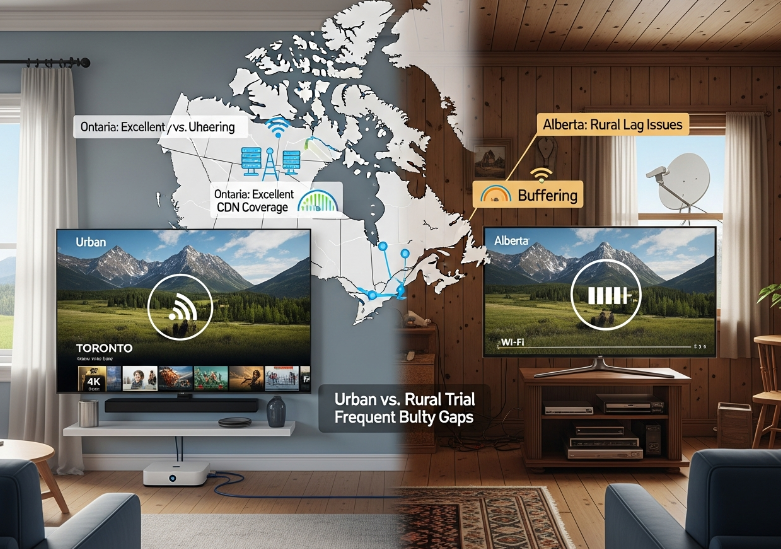
“We’ve seen 4K streaming choke in some rural Alberta spots, while it runs smooth as butter in Halifax. It’s not always the IPTV service—it’s the network path between the user and our servers.”
— Tyler M., Senior Network Engineer at StarIptv
IPTV Trial Quality by Province
| Province | Avg. 4K Stream Stability | Buffering During Peak | CDN Proximity Rating | Rural vs. Urban Gap |
|---|---|---|---|---|
| Ontario | High | Low | Excellent | Moderate |
| British Columbia | Medium | Medium | Good | High |
| Quebec | High | Low | Good | Low |
| Alberta | Low | High | Fair | Very High |
Urban vs. Rural – Not Just About Speed
Urban IPTV quality: In places like Toronto or Vancouver, you'll often enjoy smoother trials, thanks to stronger CDN proximity and better infrastructure.
Rural IPTV quality: Out in cottage country or up north, latency variations and signal jitter make 4K pretty hit or miss.
Tips to Improve Trial Quality (Even If You're in a Bad Spot)
Use an Ethernet cable over Wi-Fi — it's a game-changer.
Try using a VPN that connects closer to a regional CDN hub.
Choose trials that offer multicast support, which performs better on shaky networks.
Test during off-peak hours — like early morning or late night.
If your Canada IPTV region has been letting you down, don’t give up on IPTV yet. Sometimes it’s just about picking a provider whose content delivery network is better set up for your area.
Streaming can be super smooth—or super annoying. Where you live in Canada makes all the difference.
Too Many Options? Try These 3 First
Sports Bundle with Live Sports and Pay-Per-View
⚽ Live sports fans, this one’s for you:
Includes all major sports channels—no fluff
Streams Pay-Per-View events in smooth 4K
Holds up under pressure in real-time matches
Quick load times and barely any buffering during peak hours
Bonus Insight:
*"We spent weeks stress-testing this IPTV Canada trial under playoff conditions,"* says Mark Li, Network Reliability Lead at StarIPTV. *"It’s built to handle high-traffic spikes during Pay-Per-View events without breaking a sweat."*
Family Package with Kids Programming and Parental Controls
1. Safe content filters: Smart parental controls let you block content by age rating.
2. Channel variety: From cartoons to educational shows, it's stacked with family channels.
3. Multi-screen magic: Parents can watch dramas while kids enjoy their cartoons—no fights.
4. Set-and-forget scheduling: Some services offer automatic recording for after-school shows.
If your household's a content circus, this bundle keeps everyone happy without you babysitting the remote.
All-Rounder Trial with Multi-Screen Viewing and 4K
| Device Type | 4K Streaming Support | Multi-Screen Tested | Stability Rating (1–5) |
|---|---|---|---|
| Smart TV | ✅ Yes | ✅ Yes | 5 |
| Smartphone | ✅ Yes | ✅ Yes | 4 |
| Streaming Stick | ✅ Yes | ✅ Yes | 4 |
| Personal Computer | ✅ Yes | ✅ Yes | 5 |
This one’s your all-in-one deal.
✔️ Sharp 4K picture? You bet.
✔️ Device compatibility? Works on basically everything.
✔️ Stability test? Passed with flying colors—even during weekend binges.
✔️ Content variety? From reality TV to documentaries and live news, it’s all there.
Perfect if you want it all without the hassle.
What Makes a Good IPTV Free Trial?
Trial Length, Limited Duration, and 24-Hour Access
Some providers only offer a 24-hour access window, others go up to 7 days. That short evaluation period might not be enough for real testing.
A trial period should last long enough to try live TV, VOD, and peak hours streaming.
| Provider Name | Free Trial Length | Access Period Type | Peak Hours Stability |
|---|---|---|---|
| IPTVWave | 24 hours | Limited Duration | Good |
| StarIptv Pro | 3 days | Short-Term Trial | Excellent |
| FlowStreamTV | 7 days | Full Evaluation | Fair |
Keep in mind: longer doesn’t always mean better—quality matters more than quantity.
No Credit Card Required and Demo Account Options
Payment-free trial? Yes, please!
✅ No credit card needed = less hassle and no surprise charges
✅ Demo account access lets you hop in instantly without full setup
✅ Guest access and flexible trial registration speed up the decision-making
✅ No commitment means users are more likely to test-drive the platform
This setup builds trust. If users feel like they’re not being pushed to pay, they’re more open to upgrading.
Service Activation Speed and Onboarding Support
Fast activation is a game-changer. If setup time drags, most users bounce.
Many platforms now offer instant activation, with everything ready in under 5 minutes.
Good onboarding = simple install guides, quick-start videos, and responsive technical assistance.
"The first five minutes decide everything. That’s why we trimmed our activation down to under 90 seconds," says Jamie K., StarIptv product lead.
A smooth start tells customers, *“Hey, this service is pro-level.”*
Device Compatibility Across Smart TV, Smartphone, and Tablet
Different people, different screens. Your IPTV free trial better play nice with all of them.
Smart TVs? ✔️
Smartphones? ✔️
Tablets and streaming sticks? ✔️
Android TV, iOS, PC? All should work without weird setups.
Multi-device support = freedom. Viewers can start a show on their Smart TV, then switch to their tablet mid-episode while cooking.
Content Variety: News Channels, International Channels, and Movie Library
A good free trial offers more than just filler channels.
Expect a proper channel lineup with live news, international streams, and access to a decent movie library.
Services with diverse content—like TV series, kids programming, and VOD—let users feel the full value.
Bonus if the platform throws in some pay-per-view teasers to sweeten the deal.
No one wants a trial that only shows off basic channels. Give users content diversity, and they'll stick around.
Must-Have Features: EPG Guide, Recording/DVR, and Time-Shifting
A flashy UI means nothing if core features are missing.
EPG guide helps users plan what to watch
DVR recording and time-shifting make it easy to not miss live events
Catch-up TV is a nice touch for busy folks
These playback features should be included in the trial, not paywalled
Even if users only get a 48-hour catch-up window, it helps them test the real-world value of the service.
Conclusion
Finding a good iptv free tial isn’t just about snagging a few channels for a weekend. For anyone serious—especially folks running services or selling to others—it’s about testing what matters: speed, stream quality, and device flexibility. If the trial chokes during hockey night or the kids’ cartoons won’t load, that’s a no-go. The right trial shows its colours under pressure, not just when the menu looks pretty.
Before locking in a provider, here’s what you might want to do:
Go for trials with no credit card hoops
Use devices your customers actually own (Smart TVs, sticks, tablets)
Test across regions if your user base is coast to coast
Try a live sports stream—if it stutters, you know what’s up
Trust your gut. A solid trial should feel easy to use, not like solving a Rubik’s cube. If it clicks, you’ll know.
Ready to pick the one that works for your biz? Don’t rush. One solid trial is worth ten flaky ones.
References
[Netflix recommended internet speeds for HD and 4K streaming - https://help.netflix.com/en/node/306]
[FibreStream support: What Internet speed do I need for IPTV? - https://support.fibrestream.ca/article/rvdf4ffoh8-fibrestream-internet-speed-for-me]
[Cloudflare Learning Center: What is IGMP snooping? - https://www.cloudflare.com/learning/network-layer/what-is-igmp-snooping/]
[WhistleOut Canada: What is IPTV and how much does it cost in Canada? - https://www.whistleout.ca/Internet/Guides/what-is-iptv]