Finding the best IPTV service in Canada under $15/month can feel like hunting for a unicorn—cheap, reliable, and legal? Sounds too good to be true. But hold on. If you’ve been burned by buffering, sketchy providers, or missing channels, you’re not alone.
A lot of folks just want to watch hockey night without the stream freezing mid-shot or wondering if their payment info's floating around the dark web. Cheap doesn’t have to mean sketchy—you just need to know what to look for.
“We test our servers under real-world loads, not lab conditions,” says Mike Tran, senior engineer at StarIPTV. “If it lags during a playoff game, it’s not ready.”
In this article, you’ll get straight answers: how to spot trustworthy providers, what plan types exist, how to dodge buffering headaches, and quick ways to check for red flags before subscribing.
Is the best IPTV service under $15/month actually reliable?
You’re spending less, but does the stream hold up? Let’s find out how budget IPTV keeps things solid behind the scenes.
How M3U Playlists and EPGs Influence Stream Stability
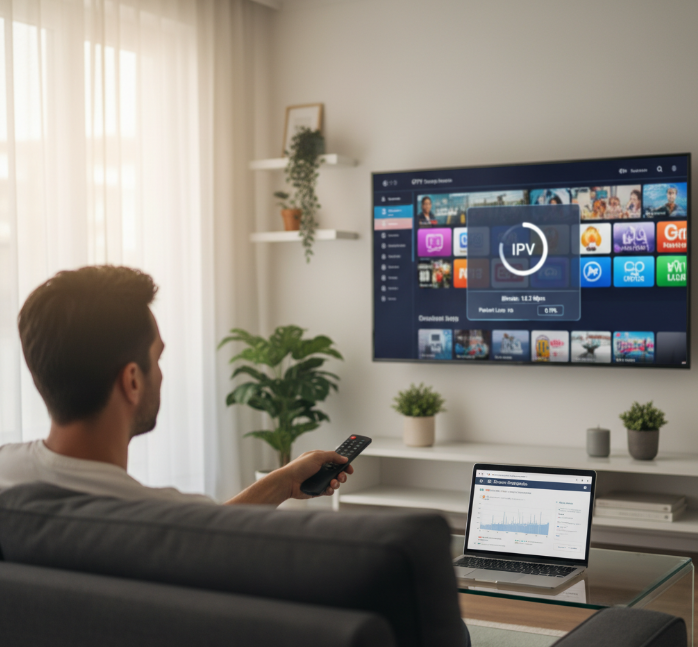
Clean M3U8 playlists prevent broken links or unresponsive channels.
An optimized Electronic Program Guide (EPG) using XMLTV formats ensures the IPTV player loads content smoothly.
A lightweight channel list with accurate metadata reduces stream URL conflicts.
Lower server latency is often linked to how well the playlist and EPG data are managed.
Avoid sketchy M3U links — they’re usually to blame for that dreaded “channel not loading” issue.
Understanding Bitrate Optimization for Low-Cost IPTV
Compression Matters – Efficient formats like H.264 or HEVC reduce bandwidth usage without killing quality.
Resolution Matching – Good services don’t stream 4K when your TV only supports 1080p — smart bitrate = smoother play.
Frame Rate Balancing – Some providers throttle to 30fps for lower cost plans, so always check what you're getting.
Adaptive Bitrate Streaming – Kicks in automatically to keep playback steady when your connection dips.
Throughput Tweaks – Some systems throttle data throughput per device — sneaky, but common under $15.
📊 Bitrate Performance Comparison Table
| Codec | Avg. Bandwidth (Mbps) | Max Res. Supported | Adaptive Streaming Support |
|---|---|---|---|
| H.264 | 3 – 6 | 1080p | Yes |
| HEVC | 1.5 – 3.5 | 4K | Yes |
| MPEG-2 | 5 – 10 | 720p | No |
Anti-freeze Technology and Buffering Algorithms Explained
The secret to freeze-free IPTV? It’s not magic — it’s smart buffering. When your stream kicks into error correction mode or adjusts buffer size based on packet loss and jitter, that’s anti-freeze tech doing its thing. Good services also tap into a strong Content Delivery Network (CDN) and sync with low-latency servers to reduce stream synchronization problems. If you’re constantly hitting the pause icon, it’s likely your provider doesn’t use proper packet recovery methods. Better tech = fewer headaches. See what buffering really is and how to reduce it.
Evaluating IPTV Providers with Secure Tunneling and Privacy Policies
Encryption and Security Highlights
Uses VPN support and strong AES-256 encryption
Offers clear data privacy terms and no shady logging policy
Includes IP masking and stealth tunneling protocols
Protection Perks for You
Stops ISP throttling dead in its tracks
Hides your real location from snooping trackers
Ensures your payment and viewing data don’t leak
“Any provider not offering encrypted streams or tunnel protocols in 2025 isn’t worth trusting — period,” says Jamie Wu, Lead Security Engineer at StarIPTV.
For site security, look for TLS/SSL on account and checkout pages; see Transport Layer Security for why it matters.
5 steps to choose the best IPTV service under $15
Too many IPTV options? Here's how to break things down in 5 chill steps without overthinking it.
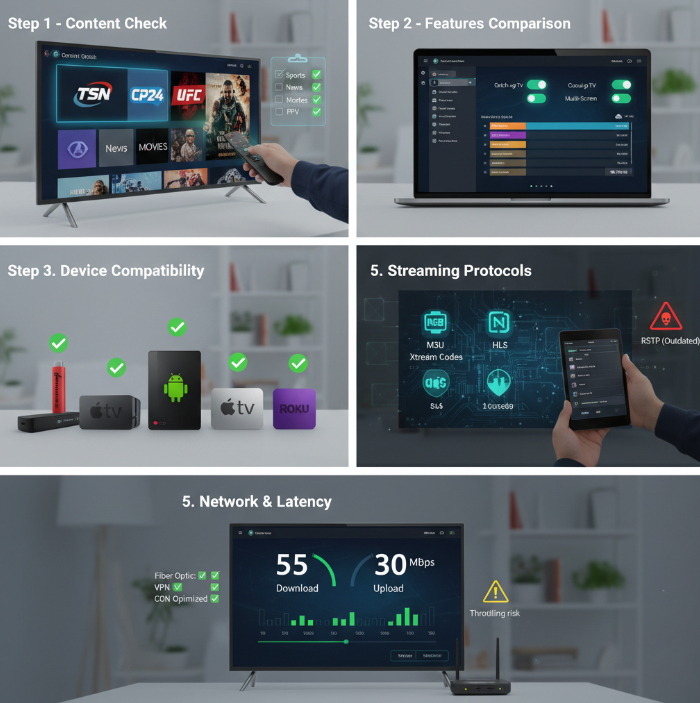
Step 1: Assess Must-Have Content Categories Like Live Sports and News
If you're into NHL, TSN, or Sportsnet, double-check those channels are in the lineup.
Want local updates? Look for CP24 or Local News options.
Love movies? Premium Channels and VOD libraries matter.
Into UFC or wrestling? Don't skip Pay-Per-View availability.
A service without your must-haves is like a pizza without cheese. Content first, everything else after.
Step 2: Compare Features Like Catch-up TV, Cloud DVR, and Time-Shifting
Catch-up TV lets you rewind and watch missed shows — no stress if you miss a game.
Cloud DVR adds flexibility. Check if it records across multiple channels at once.
Look for smart EPG layouts — if it's clunky, you'll get annoyed fast.
Multi-screen playback is key for families or shared accounts.
Don’t ignore storage limits and buffering controls — small stuff makes a big difference.
“Our users love smooth playback, but they stick around because our UI doesn’t make them want to throw the remote.”
— Jake M., StarIPTV UX Lead
Step 3: Match Devices – From Smart TVs to Streaming Sticks
Smart TV? Great. But not all IPTV apps are made equal.
Firestick, Android TV, and Roku are crowd favorites — make sure the service has dedicated apps or APKs. For setup help, see StarIPTV’s IPTV setup and IPTV on Roku guides.
Using a MAG Box or Formuler? Some services work better with those setups.
Power user? NVIDIA Shield handles 4K streaming like a beast.
If you’re using Apple TV or Smart IPTV, check for app store compatibility or side-loading options.
Not every service works out of the box — test on your actual gear, not just your phone.
Step 4: Verify Compatibility with HTTP Live Streaming and MPEG-TS
Ask if the IPTV service supports M3U Playlist and Xtream Codes login — that’s standard stuff.
Ensure it plays smoothly over HLS (HTTP Live Streaming) — super important for mobile or web use.
Watch out for sketchy video codecs that don’t play nice with your media player.
If it only supports outdated streaming protocols, expect lag and crashes. For modern ABR alternatives, see MPEG-DASH.
A decent service will hand over the tech specs. If they get cagey, that’s your red flag.
Step 5: Check for Bandwidth Requirements and Latency Reduction Guarantees
Your internet matters more than you think.
Minimum Mbps for HD is 10–15, 4K needs 25+. For baseline platform guidance, Netflix recommends 15 Mbps for 4K.
Got ISP throttling? You might need a VPN to bypass it.
Check if they use CDNs or have smart routing to reduce packet loss.
High ping = bad. A good IPTV provider will give you tips on lowering it or suggest fiber optic use.
If they don’t talk about latency, they’re not serious about performance.
Types of cheap IPTV plans
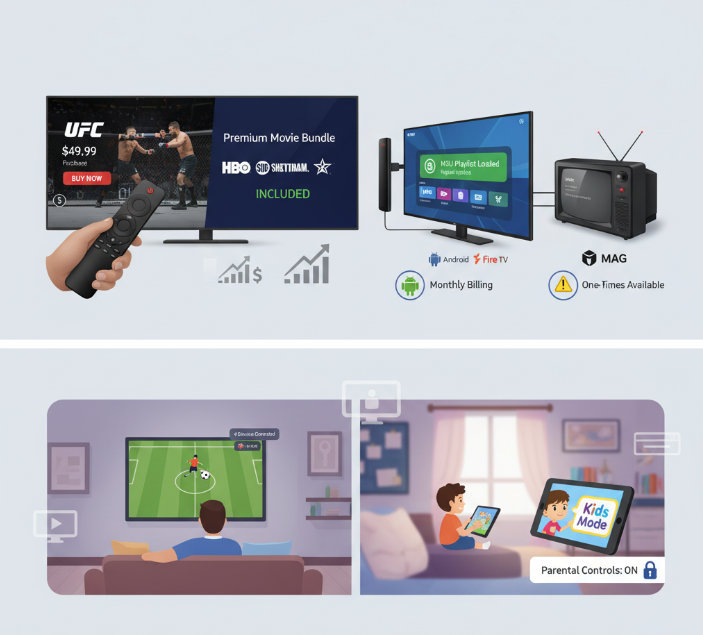
Pay-per-View Event Access vs. Premium Movie Channel Bundles
PPV content like UFC and Boxing events usually requires a one-time payment and isn't part of most standard subscriptions.
Premium bundles from channels like HBO and Showtime are often included with higher-tier plans or VOD-based upgrades.
Live Sports lovers might prefer PPV for high-profile matches, but Cinema fans will find more value in bundled channels.
PPV might sound flexible, but costs stack up fast compared to unlimited access bundles.
“We see users spend over double on PPV in a month versus subscribing to a bundled movie tier,” says Kayla D., content strategist at StarIPTV. “It adds up quicker than folks think.”
Monthly Subscriptions vs. Preloaded Set-top Box Offers
Monthly IPTV subscriptions and preloaded hardware deals both have their perks, but they're two very different beasts. Monthly billing gives you consistent updates, access to M3U playlists, and smoother integration with your devices like Android TV or Firestick. On the other hand, preloaded MAG Boxes or similar devices are true plug-and-play options, but updates are rare and customer service might be non-existent after setup.
Here’s a quick side-by-side snapshot:
| Plan Type | Cost Flexibility | Update Frequency | Device Compatibility | Middleware Support |
|---|---|---|---|---|
| Monthly Subscription | High | Weekly/Monthly | Wide (Android, Fire) | Yes (e.g., Xtream) |
| Preloaded Set-top Box | One-time | Rare or None | Limited | Often Locked |
Family Plans with Parental Controls and Simultaneous Connections
Want to stream cartoons in the kid's room while you're catching the game in the living room? Look for multi-room or multi-device plans.
Need to keep wild content away from young eyes? Kids Mode, PIN Code locks, and content filtering are your go-tos.
Sharing your IPTV login across the house? Go for concurrent streams so everyone gets their screen time.
• Bandwidth matters — too many streams can slow things down.
• Don’t skimp on account sharing rules or your stream could get kicked.
• Some plans cap you at 2 devices. Others? Up to 5, no sweat.
Family-friendly IPTV isn't just about price — it's about control, safety, and peace at home.
Buffering issues? How to pick a best IPTV service under $15
Diagnosing Problems with Network Routers and Ethernet Adapters
Not all buffering is your IPTV provider’s fault. Sometimes, the problem's right in your living room.
Poor Wi-Fi signals from old routers choke bandwidth during peak streaming hours. Consider the practical tips in WIRED’s router buying guide for improving routers and home networks. router
Cheap cables? Upgrade to Cat6 for stable Gigabit speeds.
Outdated router firmware may kill performance—always keep it updated.
Turn on QoS (Quality of Service) to prioritize video traffic over background downloads.
High packet loss or latency? Time to swap that old Ethernet adapter.
➡️ Quick fix: Plug directly into your router with a Cat6 cable instead of using Wi-Fi.
How Frame Rate and High Efficiency Video Coding Affect Playback
Ever wonder why 60 FPS looks way smoother than 30 FPS? It’s not just in your head.
FPS (Frames Per Second) directly impacts how fluid your streams look.
Modern IPTV uses HEVC (H.265) to compress videos better without killing quality.
Higher resolution demands better bitrate and stronger codec decoding power.
Older TVs and devices may choke on HEVC unless updated.
More FPS + high compression = better experience, but only if your gear can handle it.
🛠️ Pro Tip: Match your resolution and FPS to your actual internet bandwidth to avoid stuttering. For example, Netflix explains how to set playback quality and associated data usage expectations.
Using Dynamic Adaptive Streaming for Smooth Performance
Adaptive streaming is like cruise control for your IPTV. It adjusts on the fly to keep things smooth.
DASH and HLS are the MVPs of modern IPTV — they smartly switch quality as your throughput changes.
Streams are broken into segments, and each manifest file lets your device know what to load next. A plain-English primer on MPEG-DASH contrasts it with HLS.
If buffering starts, the system lowers the bitrate without stopping your show.
CDNs help reduce lag by serving content closer to you.
Bitrate switching works best when you're not fighting for bandwidth with other devices.
“Dynamic Adaptive Streaming is what makes our $12.99 plans outperform many $30 providers.” — Jordan Lee, Senior Engineer @ StarIPTV
Role of Real-Time Streaming Protocol and User Datagram Protocol
Two streaming protocols walk into a bar… one's fast, the other's careful.
RTSP and UDP are like two opposite ends of the streaming personality spectrum. RTSP streams are polite — they use TCP, wait for confirmation, and rarely drop packets. UDP streams just blast data — no waiting, super low latency, but occasional glitches. Jitter, packet headers, and transport layer settings make a difference in how IPTV feels on screen. Multicast setups using UDP are great for big spaces, like gyms or bars — fast and light on resources.
| Protocol | Latency | Reliability | Best For | Typical Use |
|---|---|---|---|---|
| RTSP | Medium | High | Precision streams | VOD, secure channels |
| UDP | Low | Medium | Live broadcasts | Sports, news |
| TCP | High | Very High | File transfer | Not optimal for IPTV |
Want a smooth, stutter-free IPTV setup on a budget? Then it’s not just about the service — it’s about the pipes and protocols behind the scenes. Upgrade smart, stream smarter.
3 key checks for secure IPTV subscriptions
Trying a cheap IPTV service in Canada? Before you pay a dime, run through these 3 sanity checks to avoid scams, poor service, or sketchy operators.
Check #1: Does the IPTV provider actually care about streaming security?
You wouldn’t leave your Wi-Fi open for the whole neighbourhood—same idea here. Real IPTV providers take data protection seriously and offer these basic security tools:
VPN compatibility: A solid provider won’t block VPN traffic and may even recommend it. That’s a green flag.
SSL encryption: Your login, payment, and account data should pass through SSL-secured pages. If your browser throws warnings, bail. Learn why TLS/SSL is the baseline for modern websites.
Secure IPTV apps: Some IPTV players support encryption and token-based logins. Ask if your provider recommends one.
“We’ve seen an uptick in phishing and fake IPTV login pages. SSL and end-to-end app security are non-negotiable now.”
— Chris F., Security Engineer at StarIPTV
Check #2: Is the payment process 100% legit?
So many fly-by-night IPTV sellers vanish after your first payment. Keep your eyes peeled:
Use of trusted payment gateways: Look for names like Stripe, PayPal, or Moneris. Manual e-transfers? Nope.
Clear pricing and refund terms: Can you cancel after a trial period? Will you get a refund if channels are missing? These should be clearly posted.
Check for auto-renewal tricks: Cheap IPTV should still respect your choice. Watch for sneaky pre-checked auto-pay boxes.
| Provider Type | Payment Gateway | Refund Policy | Warning Signs |
|---|---|---|---|
| Trusted IPTV | Stripe / PayPal | 7–14 Days | Clear terms, SSL URLs |
| Questionable IPTV | E-transfer only | No refunds | No email confirmation |
| Scam IPTV | Crypto only | None | Redirects or typos |
Check #3: Will they ghost you if something breaks?
Even if it’s only $10/month, customer support still matters. When your screen freezes right before the Leafs game, who’s gonna help?
Look for active support: Telegram groups, live chat, or at least email response within 24 hours.
Ask about service reliability: How often do they update channels? Are there backup servers for live events?
Do they offer a trial period? A 24- to 48-hour test shows confidence in the service and helps you dodge lemons. StarIPTV offers a free trial with setup help in the setup guide.
Cheap IPTV doesn't have to mean sketchy IPTV. Run these 3 checks, and you’ll avoid 90% of the junk out there. Better safe than stuck watching a buffering screen.
Conclusion
Finding the best IPTV service in Canada under $15/month isn’t just wishful thinking — it’s doable if you know what to look for. We’ve seen that price doesn’t always mean poor quality. Like choosing a good coffee shop, sometimes it’s the small, lesser-known providers that deliver the richest experience. From stream quality to features like Cloud DVR and live sports, it's about matching your needs to the right setup — not chasing big brand names.
Before you hit subscribe, keep these tips in mind:
Make sure it runs smooth on your Smart TV or tablet
Check for must-have channels like sports or kids’ content
Look for perks like time-shifting and multi-screen support
Always read the privacy policy — no one wants their info floating around
References
Apple Developer – HTTP Live Streaming (HLS) Overview – https://developer.apple.com/streaming/
Apple Developer Documentation – HTTP Live Streaming – https://developer.apple.com/documentation/HTTP-Live-Streaming
ISO/IEC 23008-2 – High Efficiency Video Coding (HEVC) – https://www.iso.org/standard/35424.html
ITU-T H.265 (HEVC) Recommendation – https://www.itu.int/ITU-T/recommendations/rec.aspx?rec=14660
MPEG – Dynamic Adaptive Streaming over HTTP (MPEG-DASH) – https://www.mpeg.org/standards/MPEG-DASH/
Cloudflare Learning Center – What is Adaptive Bitrate Streaming? – https://www.cloudflare.com/learning/video/what-is-adaptive-bitrate-streaming/
Cloudflare Learning Center – What is Buffering? – https://www.cloudflare.com/learning/video/what-is-buffering/
Cloudflare Learning Center – What is TLS? – https://www.cloudflare.com/learning/ssl/transport-layer-security-tls/
MDN Web Docs – Transport Layer Security (TLS) – https://developer.mozilla.org/en-US/docs/Web/Security/Defenses/Transport_Layer_Security
Netflix Help Center – Recommended Internet Speeds – https://help.netflix.com/en/node/306
Netflix Help Center – Playback Quality Settings – https://help.netflix.com/en/node/13444
Netflix Help Center – Data Usage per Screen – https://help.netflix.com/en/node/87
XMLTV – XMLTVFormat – https://wiki.xmltv.org/index.php/XMLTVFormat
Cloudflare Learning Center – What is MPEG-DASH? – https://www.cloudflare.com/learning/video/what-is-mpeg-dash/
WIRED – How to Buy a Router – https://www.wired.com/story/how-to-buy-a-router
FAQ
What devices can I use to watch IPTV in Canada?
Smart TVs (like Samsung, LG, or Android TV)
Set-top boxes and Android TV boxes
Streaming sticks like Fire Stick or Roku
Media players such as VLC or Kodi
Tablets and smartphones
How do I know if I'm choosing the best IPTV service for my home?
A good service gives you the shows and channels you actually watch, runs well on your devices, and offers handy features like pause, record, or kid-safe settings.
Which features should I expect from the best IPTV service under $15?
Watch shows later with Catch-up TV
Share across screens with Simultaneous Connections
Record with Cloud DVR
Auto-refresh channel lists
Built-in Anti-freeze for stable streaming
Can cheap IPTV services offer 4K and smooth playback?
Yes. Some budget-friendly options support 4K, but smooth streaming depends on your internet speed and how the service handles video quality on slower connections.
What makes a best IPTV service safer than free ones?
Uses a VPN or secure tunnel to hide your data
Clear privacy policy
Encrypts your connection
Hides your IP with masking
Has real support and safe payments
Is buffering a common problem with budget IPTV?
It can happen, but a strong router, wired internet, and services that adjust video quality smartly can keep things running smoothly most of the time.
How do I compare the best IPTV service options for live sports?
Look for high frame rate and low delay
Catch-up TV helps if you miss games
Check for real-time streaming support
Make sure sports channels are included
Do IPTV services work well on phones and tablets?
Yes. Many apps stream well on mobile, especially if they use modern formats that adjust to your internet speed.
What are signs of a reliable IPTV provider?
Uses tech that adjusts to slow connections
Has anti-freeze built-in
Lists speed requirements clearly
Supports 4K and newer video formats
Good reviews about smooth playback
Does a best IPTV service include a guide or just channels?
Many include a program guide (EPG), so you can see what’s playing now and what’s coming next. It's even better when you can pause or record shows too.